
Does Turnitin keep your paper?
Turnitin's student paper repository
Yes, if the assignment is set to store it. Turnitin's assignment settings let an instructor store submissions in the global standard repository, in a repository only your school can access, or not at all. This guide covers each setting, how removal works and how a paper can match itself.
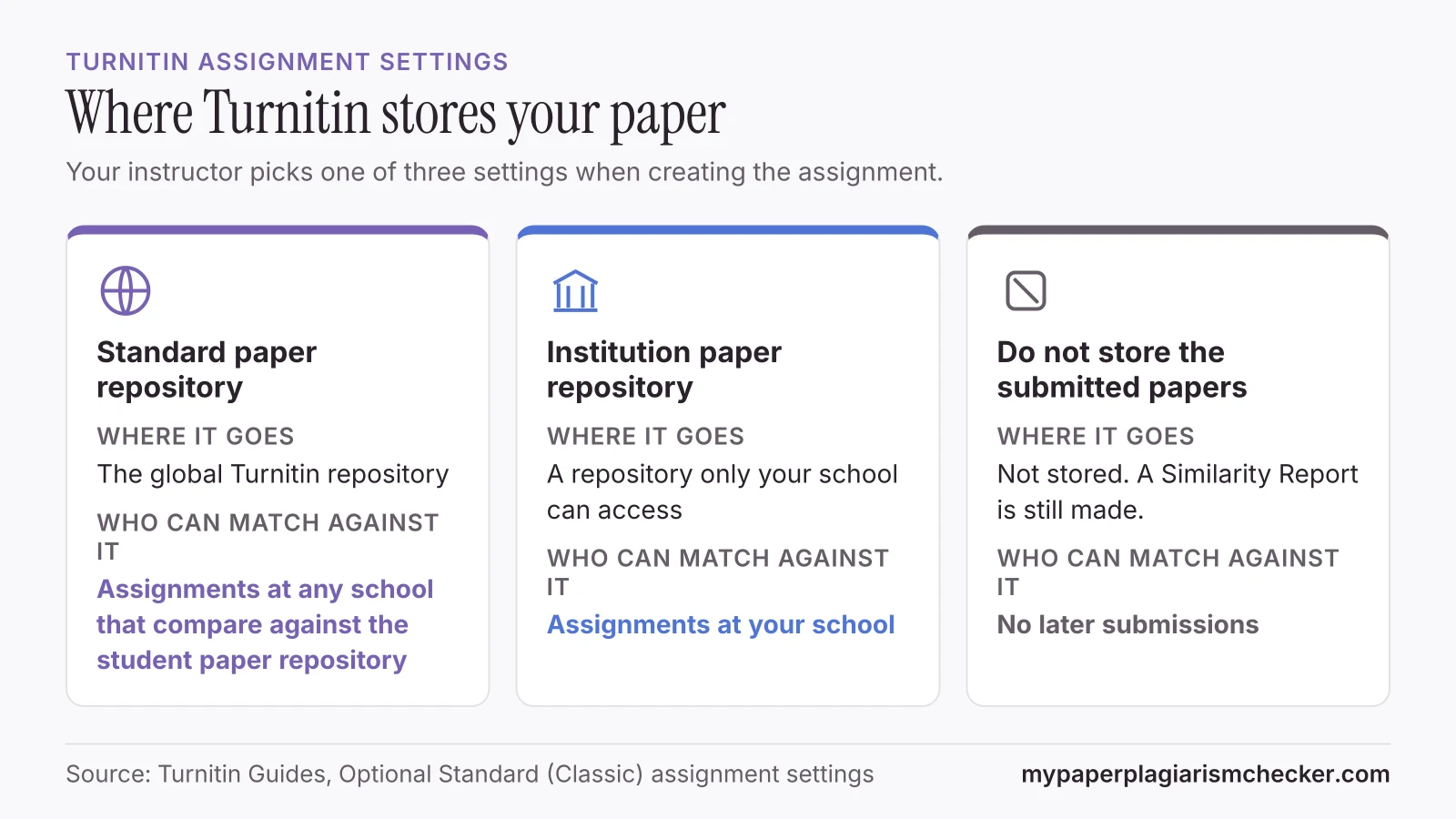
Where Turnitin stores your paper
Turnitin stores a submitted paper in whichever repository the assignment is set to use.
The instructor picks the setting when creating the assignment. If an option is missing, Turnitin tells instructors to ask their administrator to turn it on.
| Setting | What Turnitin says it does | Who can match against it |
|---|---|---|
| Standard paper repository | Submissions are stored in the global Turnitin repository. | Assignments at any school that compare against the student paper repository |
| Institution paper repository | Submissions are stored in a repository which is only accessible by your institution. | Assignments at your school |
| Do not store the submitted papers | A Similarity Report will be generated for submissions, but submissions will not be stored in the standard repository or the institution's repository for future comparison. | No later submissions |
Source: Optional Standard (Classic) assignment settings. The guide does not say which setting is the default. If you want to know where your paper went, ask your instructor.
Does Turnitin check papers from previous years?
Yes, when the assignment compares against the student paper repository. Turnitin describes that option this way: “This option compares current submissions to previous submissions in classes and assignments in Turnitin across institutions.” A paper stored in an earlier year, at your school or another one, can show up as a match.
Turnitin's student guide lists this repository as part of its database, next to “current and archived content from the internet” and “thousands of periodicals, journals, and publications”. A match with a stored paper adds to your similarity score. For how much matching text is acceptable, see what is a good Turnitin score.
How long does Turnitin keep your paper?
None of the Turnitin guides we read gives an end date for a stored paper. The only way out they describe is a permanent deletion, approved by your school's Turnitin administrator.
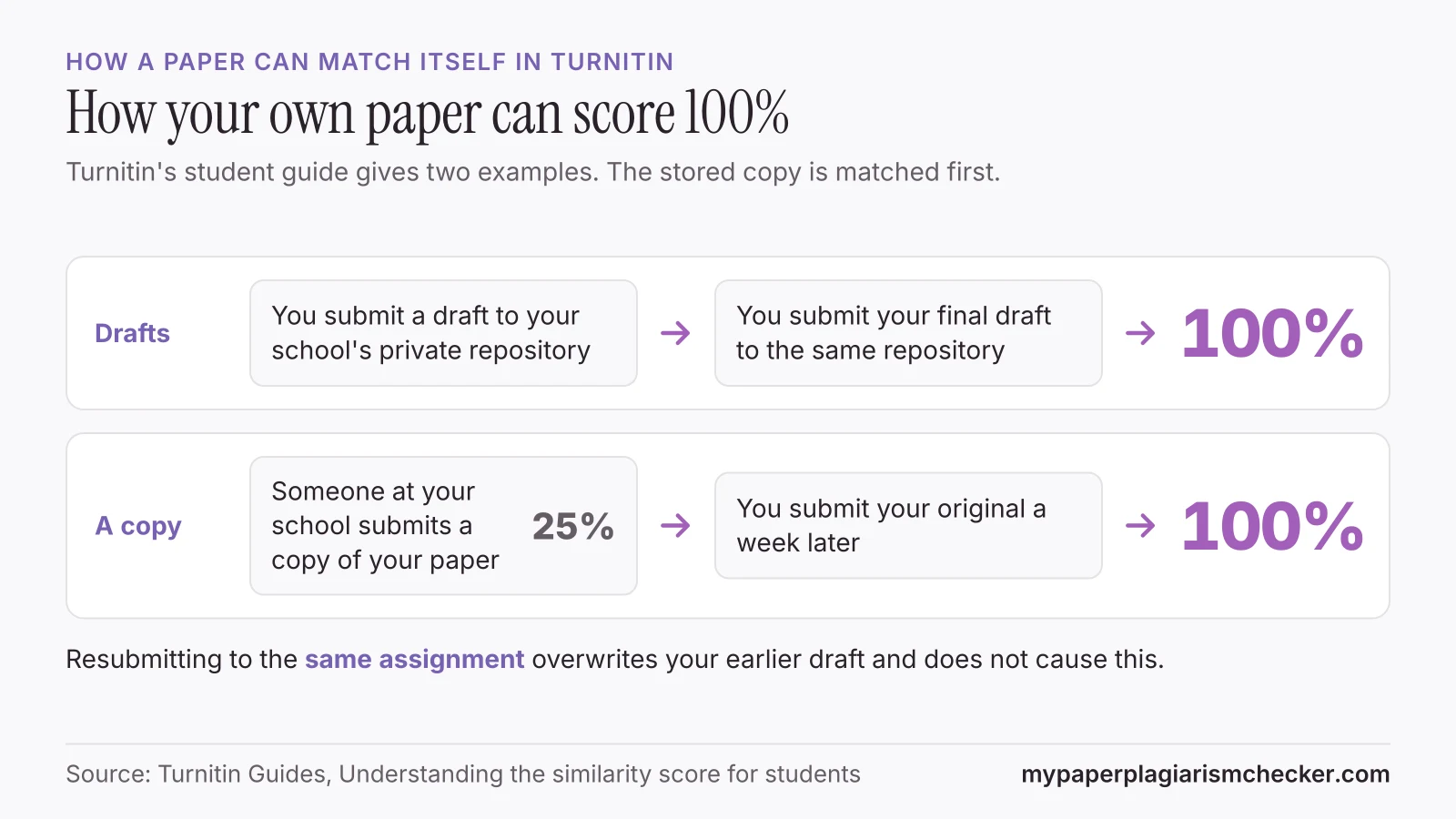
How a paper can match itself in Turnitin
If a stored copy of your paper is already in a repository, your real submission can match it, up to 100%.
Turnitin's student guide gives two examples.
“You may have submitted multiple drafts of the same paper to your institution's private repository, meaning your final draft has resulted in a score of 100%. To avoid this issue, we advise that you only submit your final draft to the private repository.”
“An individual within your institution has managed to acquire a copy of your document. They submit this document to the institution's private repository and receive a similarity score of 25%. You submit your original document a week later to the private repository but receive a 100% similarity score.”
When a second copy causes a match
Drafts in another assignment
A draft stored in a practice assignment can match the final paper you submit later.
A check bought from someone
Their assignment's setting decides if your paper is stored, and you have no way to see it.
A classmate submits your copy
Turnitin's own example: the copy is stored first, and your original then scores 100%.
An old paper reused
A paper stored for one class can match the same text in a paper for a new class.
Two things do not cause a self-match, according to Turnitin. Resubmitting to the same assignment overwrites your earlier draft, and Turnitin holds the new report for up to 24 hours so it “allows resubmissions to correctly generate without matching to the previous draft” (student guide). And a check in Turnitin Draft Coach “will not add your document to our repository” (Draft Coach article).
Outside Draft Coach, Turnitin says “you cannot self-check a paper within Turnitin without uploading it to an official assignment created by your instructor” (Turnitin Help Center). A paid “Turnitin check” from a stranger goes through someone else's assignment. If you check a long paper several times, use a checker that is not connected to Turnitin, such as our thesis plagiarism checker.
What students say about stored papers
“Bought a random Turnitin check and my paper got INDEXED. Now I'm facing a hearing. Help!”
“I am really worried that when my school checks it will say 100% because I already scanned my paper.”
Can you remove a paper from Turnitin?
Yes, but not by yourself. Your instructor asks your school's Turnitin administrator, who approves or rejects the deletion.
Turnitin's help center says: “For contractual and data privacy reasons, Turnitin cannot process deletion requests directly from students.” Turnitin Support cannot do it either. Deletions “can only be managed by your institution's administrator.”
Find your Submission ID
Open your paper in the Feedback Studio document viewer, select the information icon and copy the Submission ID.
Contact your instructor
Send the Submission ID, the class name and the name of the assignment you uploaded the paper to.
Your instructor sends the request
In the assignment inbox, the instructor chooses Request permanent deletion (or Request deletion in the newer Standard assignment) and gives a reason.
The administrator decides
Your school's Turnitin administrator approves or rejects the request. Schools can also switch deletion requests off.
If the deletion is approved, Turnitin says:
- “The submission will be removed from the instructor's and student's assignment.”
- “All reports and any associated grading will be deleted.”
- “The submission will not appear as a match to any future submissions.”
A deletion is permanent and cannot be recovered. Reports that already show the deleted paper as a match keep it until they are refreshed. Sources: Can I delete my paper from Turnitin?, Requesting the deletion of submissions and Deleting a submission FAQ.
Deletions are handled by the administrator of the account the paper went through. If your paper went in through someone else's account, the request has to go through their school.
What happens to a paper you check on My Paper Plagiarism Checker
Your paper is never sent to Turnitin or your school, so it can't match itself when you submit it there.
My Paper Plagiarism Checker keeps your paper's text and fingerprints with its report until you delete the report. Later papers checked on My Paper Plagiarism Checker are compared with stored ones, and a match never shows who wrote the other paper. A match with another student's paper counts in the score only when both papers list the same university. Otherwise it is shown and marked Not in score. Delete the report and its text and fingerprints go too.
With a free account, each new check in the plagiarism checker for students is also compared with your own earlier papers, and only you see those matches. To compare a new paper with one you wrote before, use the self-plagiarism checker. Those two papers are compared and then discarded.
Our checker cannot search Turnitin's student repository, so its score will not equal Turnitin's. See Turnitin alternative for students for how the two differ. UCAS also keeps every personal statement it screens. See do colleges check for AI in essays. My Paper Plagiarism Checker is not affiliated with Turnitin.
FAQs about Turnitin storing papers
Does Turnitin save your paper?
It does if the assignment is set to store submissions. The instructor's settings send a paper to the global standard repository, to a repository only your school can access, or to no repository. Ask your instructor which one your class uses.
What happens if I submit a paper to Turnitin twice?
Resubmitting to the same assignment overwrites your earlier draft, and Turnitin waits up to 24 hours so the new report does not match the old one. Submitting the same paper to a different assignment that stores papers can match the first copy, up to 100%.
Does Turnitin check papers from previous years?
Yes, when the assignment compares against the student paper repository. Turnitin says that option compares new submissions with previous submissions in classes and assignments across institutions, so a paper stored in an earlier year can show as a match.
Can you remove a paper from Turnitin?
Not by yourself. Copy the Submission ID, send it to your instructor with the class and assignment name, and your instructor asks your school's Turnitin administrator to delete it. Turnitin says it cannot process deletion requests from students.
How long does Turnitin keep your paper?
None of the Turnitin guides we read gives an end date for a stored paper. The only way out they describe is a permanent deletion approved by the administrator of the account the paper went through.
Does Turnitin Draft Coach save my paper?
No. Turnitin says a Similarity check in Draft Coach will not add your document to its repository, and it will not be used to match against your final paper.
Sources
- Turnitin Guides: Optional Standard (Classic) assignment settings
- Turnitin Guides: Understanding the similarity score for students
- Turnitin Help Center: Can I delete my paper from Turnitin?
- Turnitin Guides: Requesting the deletion of submissions
- Turnitin Guides: Deleting a submission FAQ
- Turnitin Help Center: Will checking my document in Turnitin Draft Coach save it to a repository?
- Turnitin Help Center: Can students check a paper in Turnitin for Similarity before submitting it to an assignment?
Pages read 14 November 2026
Check your paper before you hand it in
Free up to 3,000 words. No card needed.