Do exam boards check NEA for AI?
AI rules for NEA, coursework and the EPQ
Yes. Under JCQ rules your teacher must be sure your NEA or EPQ is your own work before accepting it, and once you have signed your declaration, suspected AI misuse is reported to the exam board. Unacknowledged AI use is malpractice. This guide covers what JCQ says, what AQA, OCR and Pearson add, and the EPQ.
What JCQ's AI Use in Assessments says
The work you hand in must be your own, and any AI use must be acknowledged. The rules apply to NEA, coursework and other internal assessments for GCSEs, A levels, the EPQ and vocational qualifications.
JCQ sets the shared rules that AQA, OCR, Pearson and the other main exam boards follow. Its document says “teachers and assessors must only accept work for qualification assessments which is the students' own”. Your school must give you JCQ's Information for Candidates on AI before you start.
What counts as AI misuse
JCQ says “AI misuse is where a student has used one or more AI tools but has not appropriately acknowledged this use and has submitted work for assessment when it is not their own.” Its examples include:
- “Copying or paraphrasing AI-generated content such that the work submitted for assessment is no longer the student's own.”
- “Using AI to complete parts of the assessment so that the work does not reflect the student's own work, analysis, evaluation or calculations.”
- “Failing to fully acknowledge use of AI tools, including when they have been used in the preparation and production of work, as a source of information, guidance, planning or to structure the work.”
- “Failing to appropriately acknowledge the use of AI tools for spelling, punctuation and grammar.”
The September 2026 update added planning, structuring, grammar support and translation to the list when they are not acknowledged. Even acknowledged AI use earns no marks if you have not met the marking criteria yourself: “if they use AI and they have not independently met the marking criteria, they will not be rewarded.”
How teachers and exam boards check NEA for AI
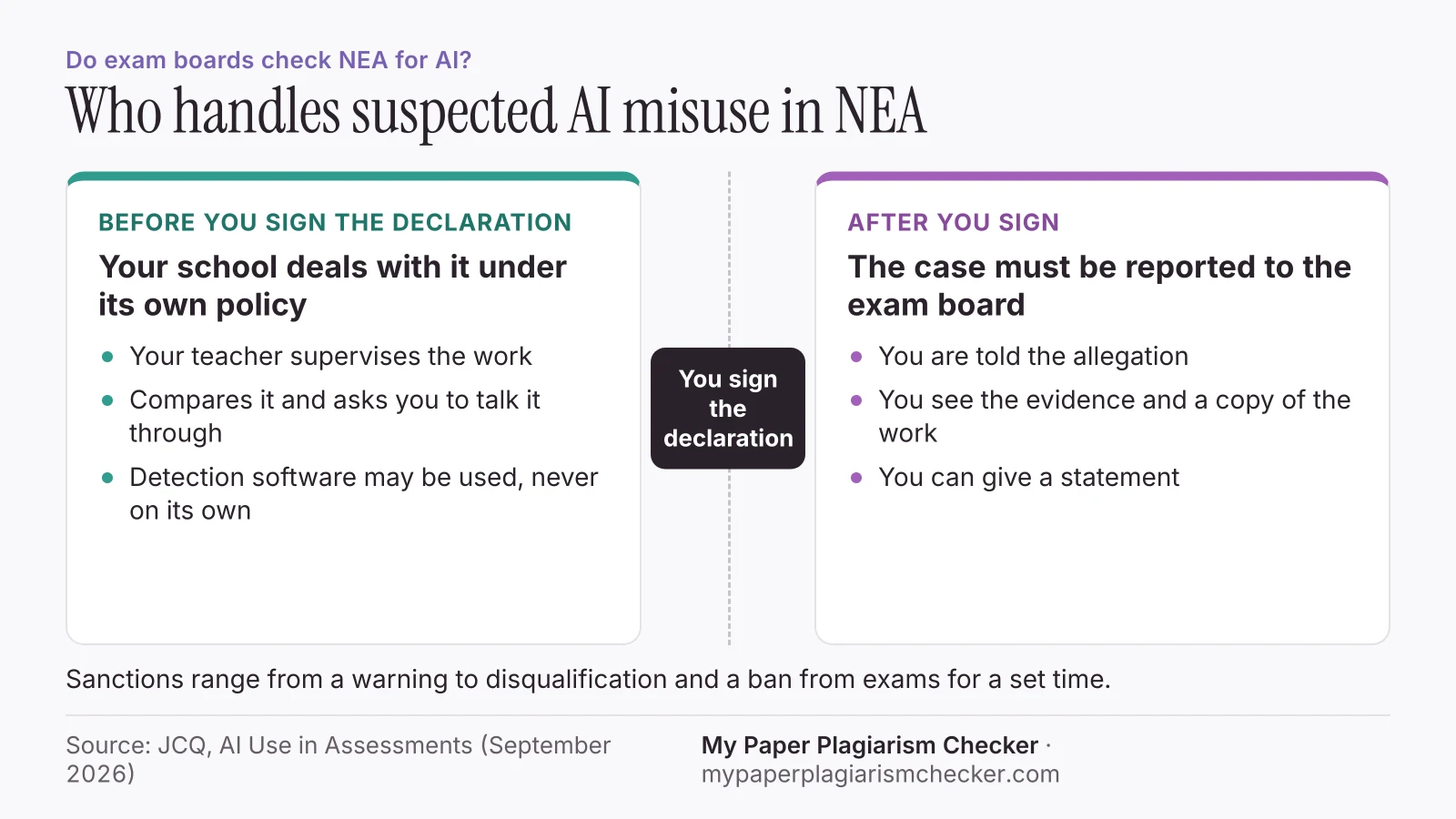
Your teacher checks first, before you sign the declaration. After you sign, a suspected case goes to the exam board.
Your teacher watches the work develop
OCR reminds teachers “they must provide sufficient supervision so they can confidently authenticate that the NEA work submitted is the student's own.”
They compare and ask questions
JCQ suggests asking the student “to talk them through the work, or how they approached producing it, including previous versions”, and ‘Cloze’ tests where you finish a sentence from your own work.
Detection software may be used
JCQ names Pangram, Copyleaks and Turnitin. It says they “can produce both false positives and false negatives” and must be part of “a holistic approach”.
You sign the declaration
You confirm the work is your own. Pearson says its NEA authentication sheets “now reference AI use explicitly.”
Signed work goes to the board if misuse is suspected
“If AI misuse is detected or suspected by the centre and the declaration of authentication has been signed by the student, the case must be reported to the relevant awarding organisation.”
If a case is reported, JCQ says you must be informed of the allegation, shown the evidence including a copy of the work, and allowed to write a statement. If a detector flagged writing you did yourself, why is my writing flagged as AI explains the common causes.
How to acknowledge AI in your NEA
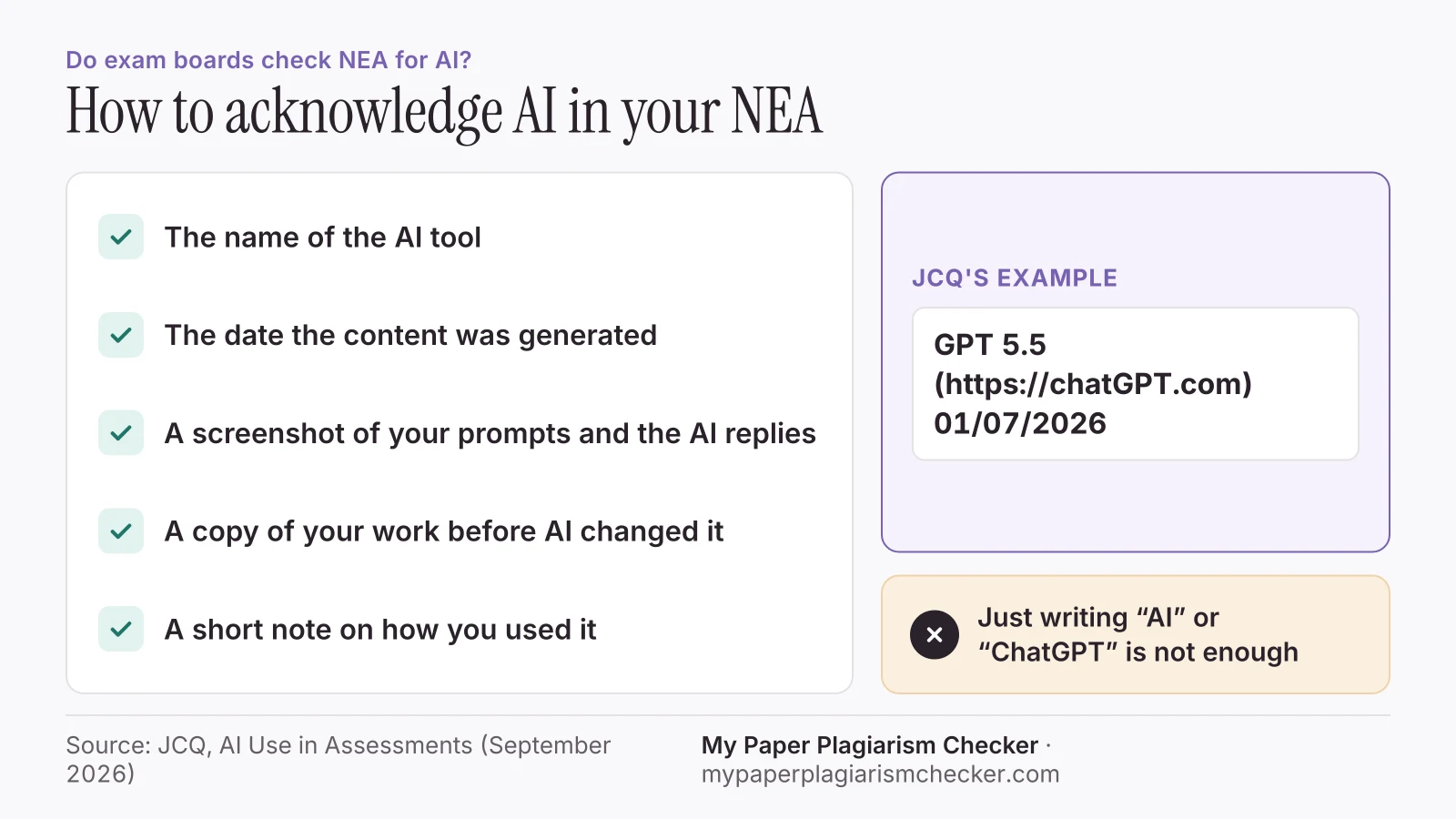
Give the tool name and the date, keep a screenshot of your prompts and the replies, and explain briefly how you used it.
“Student acknowledgement must show the name of the AI source used and the date the content was generated. For example: GPT 5.5 (https://chatGPT.com) 01/07/2026”
- Keep “a copy of the prompt(s) used and the AI-generated content” in “a non-editable format (such as a screenshot)”.
- If an AI tool changed your work directly, keep “copies of the original work prior to any modification”.
- Be specific. JCQ says “it would be unacceptable to simply reference ‘AI’ or ‘ChatGPT’”.
- Hand the record in with your work so your teacher can check it.
University essays use APA, MLA or Chicago instead. See is using AI cheating for those formats.
What AQA, OCR and Pearson add
All three follow JCQ. They add subject guidance on which tasks AI may help with.
| Exam board | What its guidance says | Source |
|---|---|---|
| AQA | Publishes subject notes on valid and unacceptable AI use. For the EPQ: correctly referenced use of appropriate AI tools may be credit-bearing, however unacknowledged use is malpractice. | AI guidance, Extended Project Qualification (7993) |
| OCR | Added an AI use in the NEAsection to its specifications, from Art and Design to Physics, and an AI use in the EPQsection to its Extended Project teacher guides. | AI guidance for NEA components |
| Pearson Edexcel (A level Geography) | AI may support research, understanding, and planningbut cannot generate assessed NEA content.AI may not Write or re-word any NEA sectionor Provide specific feedback that shapes assessed content (beyond SPaG). | GCE Geography AI Guidance |
Rules differ by subject. Ask your teacher for the AI guidance for your specification before you start.
AI and the EPQ
AQA's EPQ guidance lists many valid uses of AI. You must record each one in your production log, and AI output earns no credit on its own.
Valid uses include “Idea generation for questions, approaches or topics”, summarising a long article to decide if it is relevant, and help “with project planning and time management.” It also says:
- “Learners may not receive direct credit for the AI content itself.”
- “Learners must evidence all the questions/prompts, together with the exact responses provided by the AI.”
- “Using Grammarly or similar to generate writing that is not the learner's own is unacceptable.”
JCQ's published cases include a Pearson Extended Project flagged by “detection software as containing several unacknowledged sections of AI-generated content.” The student declined to give a statement, and the board decided the student “should be disqualified from the qualification.”
What happens if AI misuse is found
Sanctions range from a warning to disqualification and a ban from taking exams for a set time.
“The sanctions applied to a student committing plagiarism and making a false declaration of authenticity range from a warning regarding future conduct to disqualification and the student being barred from entering for one or more examinations for a set period of time.”
Before you sign the declaration, your school can deal with a concern under its own policy, and JCQ says it does not have to be reported to the board. University cases follow a different process, covered in academic misconduct and AI.
What students ask about AI in NEA and EPQ
Students run their own NEA or EPQ through free detectors, get a high score on work they wrote, and ask whether the board checks.
“I have just finished my geography NEA, scanned it through several AI detector just now and its coming out at like 25-35% AI?”
“I ran it through some AI checkers and it has been flagged on multiple sites - ranging from 35% to 76%.”
“Do you think OCR checks AI?”
“Your teachers will tell you if you're allowed to use AI tools when doing your coursework, the rules will depend on your qualification.”
These come from 12 threads on The Student Room about NEA, EPQ and exam board AI checks, part of about 1,800 student threads we collected in November 2026.
Checking your NEA or EPQ before you hand it in
A pre-check shows which sentences read as AI-written, so you can review them before your teacher authenticates the work.
The AI detector for students highlights those sentences and gives an AI score, and the plagiarism checker for students shows passages that match other sources, as the sample report shows. Different detectors give different scores for the same text. No AI detector result, including ours, proves how a text was written, and your teacher's authentication is what counts.
Your paper is never sent to Turnitin or your school, so it can't match itself when you submit it there. My Paper Plagiarism Checker keeps the text with its report until you delete the report.
FAQs about AI in NEA and EPQ
Do exam boards check for AI?
Yes. Teachers must authenticate NEA and coursework before it is sent, and exam board staff, moderators and examiners are trained to spot and report malpractice. In one case JCQ published, detection software flagged an Extended Project during a regular review, and Pearson disqualified the student.
Can I use AI for my NEA?
Sometimes, for limited tasks such as research or planning, if your teacher and the subject guidance allow it, and only if you acknowledge it. You cannot use AI to write the assessed work. Pearson's A level Geography guidance, for example, says AI may not "Write or re-word any NEA section."
Does OCR check for AI?
OCR follows the JCQ rules. It has added an "AI use in the NEA" section to its specifications and reminds teachers they must supervise enough to confidently authenticate that the NEA is the student's own work.
Does AQA check for AI?
AQA follows the JCQ rules and publishes subject notes on valid and unacceptable AI use, including for the EPQ. Its EPQ guidance says "unacknowledged use is malpractice."
Do teachers actually check for AI?
Yes. JCQ lists ways teachers check: comparing work with what you have written before, asking you to talk through your work, and short completion tests on your own sentences. Detection software can be used, but JCQ says it "must not be relied upon in isolation."
What happens if my coursework is flagged as AI?
If you have not yet signed the declaration of authentication, your school can deal with it under its own policy. Once you have signed, suspected AI misuse must be reported to the exam board. You must be told the allegation, see the evidence and be allowed to give a statement.
Sources
- JCQ: AI Use in Assessments: Your role in protecting the integrity of qualifications (effective from September 2026)
- AQA: Notes and guidance: Artificial intelligence (AI) guidance, Extended Project Qualification (7993)
- OCR: AI guidance for NEA components
- Pearson: Pearson Edexcel A Level Geography NEA, Artificial Intelligence (AI) Guidance
Pages read 14 November 2026
Check your NEA before you hand it in
Free up to 3,000 words. No card needed.