What percentage of AI is acceptable on Turnitin?
What the Turnitin AI score means
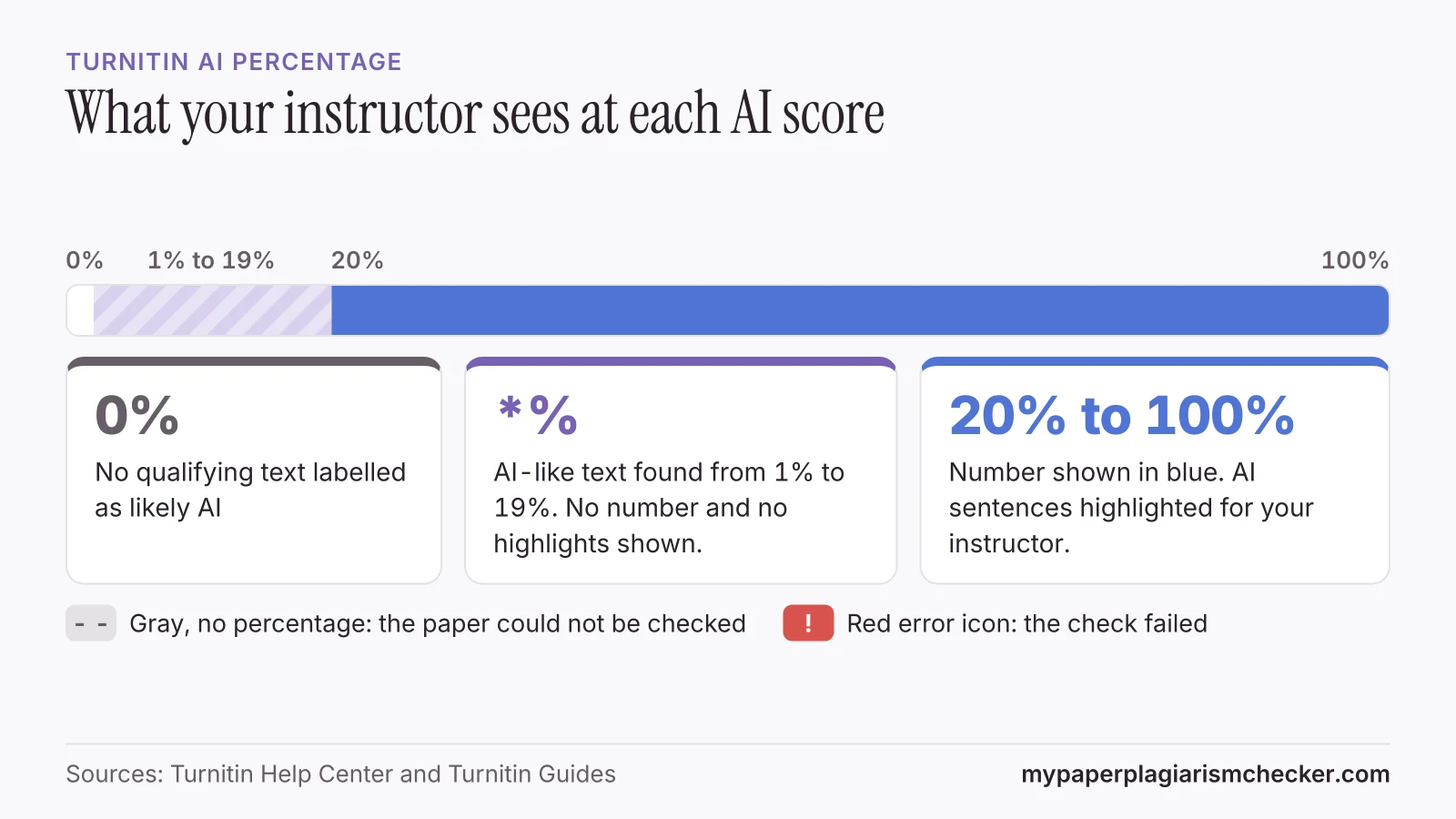
Turnitin does not set an acceptable AI percentage. Its guides say the score is data for your instructor, who decides under your school's policy. Scores from 1% to 19% show only as an asterisk (*%).
What the Turnitin AI percentage means
The AI percentage is the share of your paper's prose sentences that Turnitin's model labels as likely written by AI, or written by AI and then changed by a paraphraser or bypasser tool.
Turnitin gives each sentence a score and labels the ones above its threshold as AI. The paper's score is the share of sentences labelled AI. Only prose sentences in long-form writing count. Lists, headings, tables, references and code are left out of the count.
“This percentage is not necessarily the percentage of the entire submission. If text within the submission is not considered long-form prose text, it will not be included.”
“The percentage generated by Turnitin's AI writing detection model is different from and independent of the similarity score.”
So a paper can have a 5% similarity score and a 60% AI score, or the other way round. For the matching-text number, see what a good Turnitin similarity score is. For which AI tools Turnitin says it picks up, see can Turnitin detect ChatGPT.
Is there an acceptable AI percentage on Turnitin?
No. Turnitin publishes no acceptable AI percentage, and says its score should not decide a case on its own.
“the percentage on the AI writing indicator should not be used as the sole basis for action or a definitive grading measure by instructors.”
“The final decision on whether any misconduct has occurred rests with the reviewer/instructor.”
Universities say the same. The University of Melbourne tells students that “an AI writing detection report alone is not sufficient evidence for an allegation”, and that “the acceptable use of AI will vary across disciplines, subjects, and assessment tasks.” (University of Melbourne)
Some websites list “safe” AI bands, such as under 20%. We found no Turnitin page that sets one. To know what applies to you:
- Read the AI policy in your syllabus and assignment brief.
- Ask your instructor which AI tools, if any, are allowed for this task.
- Keep your drafts and notes, in case you need to show how you wrote the paper.
If your own writing was flagged, read falsely accused of using AI for the steps to take.
What the asterisk (*%) means on a Turnitin AI score
An asterisk means Turnitin found some AI-like text, but less than 20%. Turnitin hides the number and the highlights in this range to avoid false positives.
“To avoid potential incidences of false positives, Turnitin does not display specific numerical scores or source highlights for AI detection levels within the 1% to 19% range.”
Turnitin made this change in July 2024. Its guide says: “If your report was generated before July 8, 2024, then you may still see a numerical score below 20%.” Turnitin's pages word the range in two ways. One line in its main guide says “between 0 and 20”. Its newer help center article and its release notes say 1% to 19%, which is the range used here.
Is 20% AI on Turnitin bad?
Turnitin does not say. 20% is the lowest AI score Turnitin shows as a number, and from 20% the matching sentences are highlighted for your instructor. Turnitin gives no meaning to any score above that. Your instructor reads the highlighted sentences and decides under your school's policy.
What the Turnitin AI indicator colours mean
Blue shows a processed score, gray means the paper could not be checked, and a red error icon means the check failed.
Turnitin's guide says: “The icon color reflects its status and may appear blue, gray, or red.” These are the states it lists.
| What your instructor sees | What it means |
|---|---|
| Blue, with a percentage from 20% to 100% | The paper was processed. The number is the share of qualifying text Turnitin labels as likely AI-generated. |
| Asterisk (*%) | AI-like text was found in the 1% to 19% range. No number and no highlights are shown. |
| 0% | No qualifying text was labelled as likely AI-generated. |
| Gray, with no percentage (- -) | The paper could not be checked. It may predate the feature or not meet the file requirements, such as at least 300 words of prose. |
| Red error icon | The check failed and the report cannot be opened. |
Sources: How to access the AI Writing Report and Using the AI Writing Report.
Inside the report, sentences labelled as AI are highlighted in blue. Turnitin's current guide puts AI text that was later changed by a paraphraser or bypasser tool in the same AI-generated highlight. Reports from July 2024 showed two figures: “AI-generated only” and “AI-generated text that was AI-paraphrased” (release notes). A score only changes if the paper is submitted again.
What students ask about AI percentages
Students most often ask whether a score just above 20% is a problem, and what a high score will lead to.
“I've had a score of 20% on my turnitin AI score. This means it's just over the borderline of a *%. Can this be a red flag for my marker?”
“I wrote a four page essay, only for turnitin to flag, and get an email from my professor that it's flagged at 72% AI.”
These come from about 1,800 student threads we collected from Reddit, Quora, The Student Room and other forums in November 2026. If your writing is your own and it keeps scoring high, see why your writing can be flagged as AI.
Checking an AI score before you submit
You cannot see your Turnitin AI score before or after you submit, unless your instructor shares the report.
Turnitin shows the AI report to instructors and administrators only, as explained in can students see their Turnitin AI score. To review your writing first, the AI detector for students highlights the sentences that read as AI-written and gives one AI score for the paper. It uses our own model, so its number will differ from Turnitin's. No detector result, ours included, proves how a text was written. If English is not your first language, see the AI detector for ESL students.
Your paper is never sent to Turnitin or your school, so it can't match itself when you submit it there. My Paper Plagiarism Checker is not affiliated with Turnitin.
FAQs about Turnitin AI scores
What is an acceptable AI score on Turnitin?
Turnitin does not set one. Its guides say the AI percentage should not be the sole basis for action, and that the final decision rests with your instructor. What counts as acceptable AI use depends on your course and school policy.
What does * mean in Turnitin's AI check?
The asterisk (*%) means Turnitin's model found some AI-like text, but less than 20%. Turnitin hides the number and the highlights in the 1% to 19% range to avoid false positives.
Is 20% AI on Turnitin bad?
Turnitin does not say. 20% is the lowest AI score Turnitin shows as a number. Your instructor decides what it means for your paper, using your school's policy.
Is 40% or 47% a bad Turnitin score?
First check which score it is. The similarity score and the AI percentage are separate numbers. Turnitin sets no pass mark for either one. Your course or school sets the expectations.
Does Turnitin tell you your AI score?
No. Turnitin says the AI writing indicator and report are not visible to students. Your instructor can download the report as a PDF and share it with you.
Sources
- Turnitin Guides: Using the AI Writing Report
- Turnitin Guides: How to access the AI Writing Report
- Turnitin Guides: Turnitin's AI writing detection capabilities FAQs
- Turnitin Help Center: Why is the AI Writing Detection report score showing as *%?
- Turnitin Guides: AI writing detection model
- University of Melbourne: Turnitin and AI writing detection
Pages read 14 November 2026
Check your paper before you hand it in
Free up to 3,000 words. No card needed.